Connect a personal WeChat bot to a Manyfold agent through the Tencent iLink gateway.
Connect WeChat when you want an agent to answer direct messages in personal WeChat. Manyfold connects through Tencent’s official iLink bot gateway: you authorize a bot by scanning a QR code with WeChat, and Manyfold long-polls the gateway with the resulting bot token. No public webhook is required.
WeChat support is direct-message only. The iLink identity you authorize is a bot account (…@im.bot); it cannot be added to ordinary WeChat group chats, and the gateway does not deliver group events. There is no group, mention, or thread behavior to configure.
What the channel supports
| Capability | Support |
|---|---|
| Direct messages | Yes; every message a user sends the bot drives the agent. |
| Group chats | No; personal WeChat bots cannot join groups and group events are not delivered. |
| Live progress | No; WeChat cannot edit a sent message, so the agent replies once the turn finishes. A typing indicator shows while it works. |
| Slash commands | Typed commands are supported; WeChat has no Manyfold-managed native command menu. |
| Files and media | Receives images and whitelisted document types; sends images and files the agent links. Voice notes use WeChat’s own transcription when present; audio and video arrive as a short placeholder. |
| Replies | Yes; a quoted message is passed to the agent as a short context line. |
| Agent-initiated sends | Yes, best-effort; the recipient must have messaged the bot at least once so a reply credential exists. |
Prerequisites
- An existing Manyfold agent.
- A personal WeChat account to scan the bot QR code.
- An iLink bot token, only if you connect with Paste token instead of scanning inside Manyfold.
The bot token is bound to the authorized session, not to a source IP, so Manyfold can keep the connection running from its servers after you authorize from your phone. If the session later expires, WeChat returns error code -14 and you re-scan to issue a new token.
Connect it to Manyfold
-
Open Settings -> Channels.
-
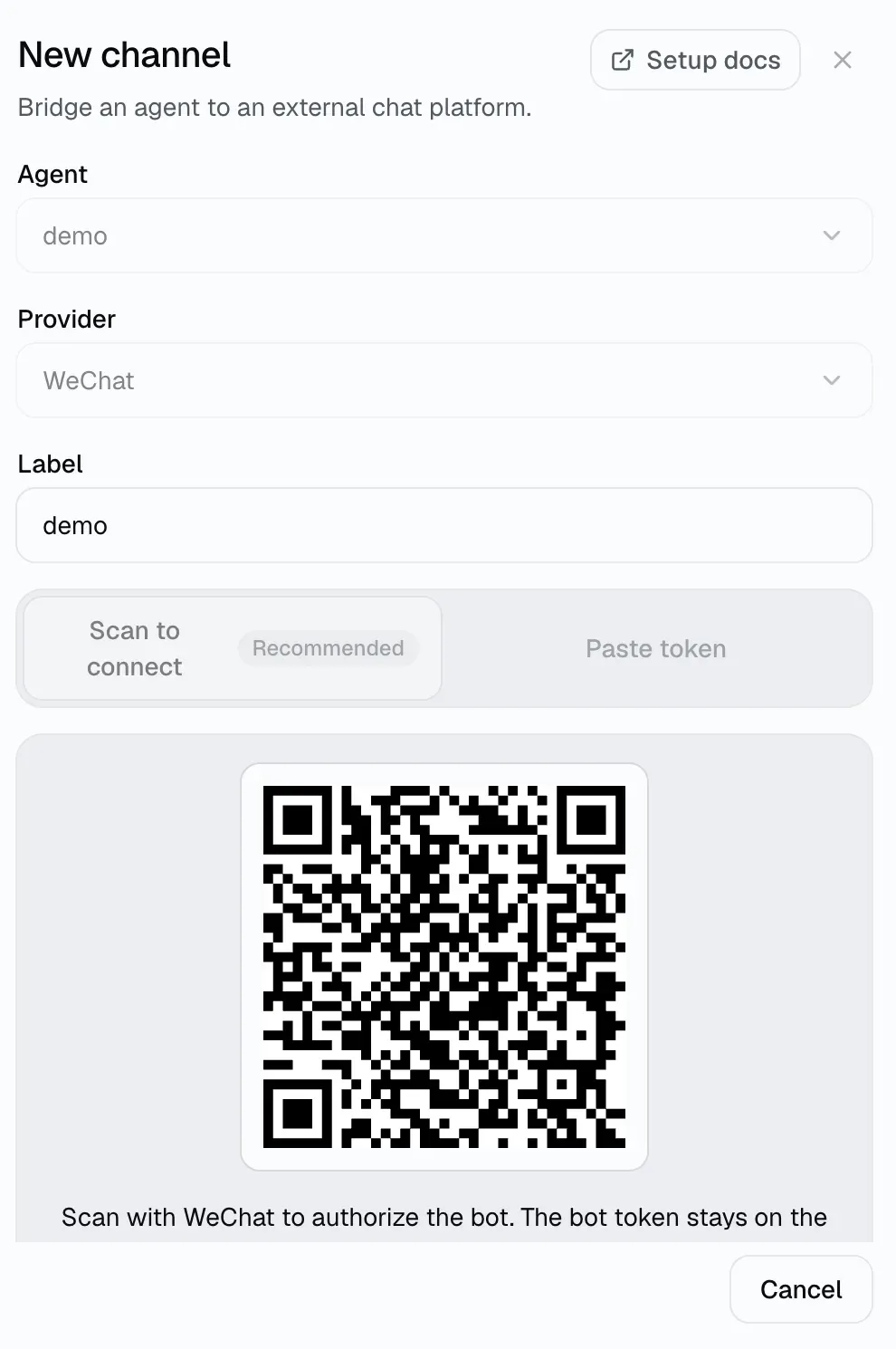
Create a channel and choose WeChat.
-
Select the agent and enter a label.
-
Choose how to authorize the bot. Scan to connect is the recommended path and needs no token of your own.
- Scan to connect: scan the QR code shown in the dialog with WeChat to authorize the bot.
- Paste token: paste an iLink bot token you already hold. Leave the gateway base URL blank to use the default gateway.
-
Optionally restrict who may use the bot with Allowed user IDs, and who may run agent-level commands with Operator user IDs.
-
Create the channel and run Register.
-
Message the bot from WeChat.
-
Run Test.
Registration verifies the token against the gateway and activates the channel. The first poll stores a sync cursor without replaying the recent backlog as new agent turns; later polls deliver new messages. You do not need to expose or copy the Manyfold inbound URL.
Access control
- Allowed user IDs is an allowlist of iLink user IDs (for example
wxid_xxx@im.wechat). Empty means anyone who messages the bot is allowed. - Operator user IDs control agent-level commands such as
/model. An empty operator list denies those commands for everyone (fail-closed). - A user’s iLink ID appears in the channel’s delivery log the first time they message the bot; copy it from there to build the allowlist.
Message behavior
- Replies are filtered for the WeChat bot renderer: code blocks, inline code, tables, and bold pass through; unsupported markdown such as italic markers around Chinese text, small headings, and image syntax is stripped.
- Long answers are split into chunks (2,000 characters by default) sent in order with a short pause between them.
- If the gateway rate-limits sending (error code
-2), the channel briefly pauses outbound sends and retries; a chunk that still fails after the first one is delivered leaves a short “message truncated” note instead of resending the earlier text. - Voice notes are delivered as their WeChat transcription when one is present; audio and video arrive as a short placeholder because those formats are outside the attachment policy.
- Inbound images and whitelisted document types are downloaded, decrypted, and passed to the agent as attachments. When the agent links a workspace file in its reply, images are sent as images and other files as file messages. The link itself reads as its label in the text reply, since the file follows it.
- A quoted (referenced) message is passed to the agent as a short
[Replying to: …]context line. - A typing indicator is shown while the agent works.
Agent-initiated sends
The agent bound to an active WeChat channel can reach out first with mf channels send. A human token can use the same command when it owns the channel and has channels:edit.
mf channels send <channelId> --user-id 'wxid_xxx@im.wechat' --text 'Your build finished.'Because WeChat replies require a per-recipient credential that the gateway issues when a user messages the bot, an agent-initiated send only reaches someone who has messaged the bot before. If no credential is available, the send fails with a clear message. Agent-initiated sends are limited to 30 per minute per channel.
Settings
| Setting | Recommendation |
|---|---|
| Allowed users | Use an allowlist for a private deployment. Empty allows anyone who messages the bot. |
| Operator users | Add the iLink user IDs allowed to run agent-level commands. Empty denies those commands for everyone. |
| Attach files the agent links | Keep on to upload files linked by the final agent answer; turn off for text-only output. |
| Send message context | Keep on so the agent receives the sender and message IDs. |
Verify
Run Test. A healthy result confirms the gateway is reachable, the token is accepted, and the channel status is active. The result separately reports whether a sync cursor has been stored; not stored yet does not fail the test, but you should wait for the first poll before sending the verification message.
Troubleshooting
- Token rejected or channel reports session expired (
-14): the iLink session has expired. Generate a new QR code on the channel and scan it again to reconnect. If the channel was connected with Paste token, issue a new token and update it on the channel instead. - Channel stays connecting or reports a gateway error: confirm the iLink gateway is reachable from Manyfold and the token is current.
- Bot does not respond: confirm the sender is in Allowed user IDs (or leave it empty), and that the channel status is active.
- An agent-level command is denied: add the sender’s iLink user ID to Operator user IDs.
- An agent-initiated send fails: the recipient must have messaged the bot at least once so a reply credential exists.
- A group message is ignored: personal WeChat bots are direct-message only; the gateway does not deliver group events.